
SmartRoutes connects to the tools you already run your business on.
Depending on your setup, you can link up in a couple of clicks with a ready-made integration, build something custom with the Open API, or listen for events in real time with webhooks.
This guide covers all three, plus how order status stays in sync between SmartRoutes and your other systems.
Out-of-the-box integrations
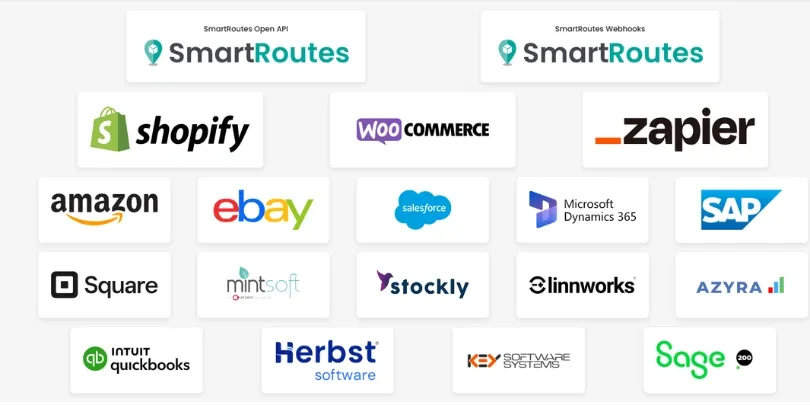
SmartRoutes connects directly with a growing list of eCommerce, ERP, and inventory platforms. Click on any platform from the Integrations page to start the setup flow.
Current out-of-the-box integrations include:
- eCommerce: Shopify, WooCommerce, Amazon, eBay
- CRM & ERP: Salesforce, Microsoft Dynamics 365, SAP, Sage 200
- Inventory & fulfillment: Mintsoft, Stockly, Linnworks, Azyra
- Point of sale & accounting: Square, QuickBooks
- Industry-specific systems: Herbst Software, Key Software Systems
- Automation: Zapier, for connecting to thousands of other apps without custom development
New integrations are added regularly, so it's worth checking back on the Integrations page if the tool you use isn't listed yet.
How to connect one:
- Go to Settings > Integrations.
- Click on the platform you want to connect.
- Follow the on-screen prompts to authenticate and link your account.
Two-way order sync explained
Most out-of-the-box integrations sync in both directions, not just one. Orders flow from your source platform into SmartRoutes for route planning, and delivery status flows back out once a driver completes the stop.
How it works, using Shopify as an example:
- An order is placed and marked ready for delivery in Shopify.
- It appears automatically in SmartRoutes, ready to be added to a route.
- Once the route is planned and dispatched, the driver delivers the order and marks it complete on the mobile app.
- SmartRoutes pushes that completion status back to Shopify, and the order is automatically marked as fulfilled.
This removes the need for manual status updates on either side. Your fulfillment records and delivery records stay accurate without anyone re-entering data. The same two-way flow applies across other supported eCommerce and ERP integrations, not just Shopify.
SmartRoutes Open API
If you use software that isn't in the out-of-the-box list, or you need a more tailored connection, the Open API lets you build a direct integration. It's organized around REST, returns JSON, and uses standard HTTP response codes and authentication.
With the API, you can programmatically create and update orders, manage customers and vehicles, retrieve route and stop data, and trigger route optimization directly from your own systems.
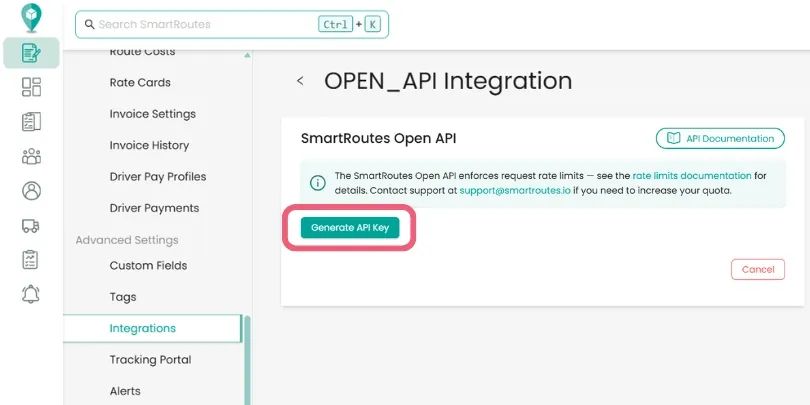
How to generate your API key
- Go to Settings > Integrations.
- Select SmartRoutes Open API.
Click Generate API Key.
Once generated, include your key in the header of every request as x-access-key: YOUR_ACCESS_KEY. Full endpoint references, request/response examples, and error codes are available in the SmartRoutes API documentation.
A few things to note before you start building
- Requests are rate-limited by endpoint type, with most limits in the range of 30-60 requests per minute.
- State-changing requests support an optional idempotency key, so retries don't accidentally duplicate data.
- Paginated endpoints use a
Linkheader to fetch the next page of results.
Webhooks
Webhooks let your systems react the moment something changes in SmartRoutes, without having to poll the API for updates.
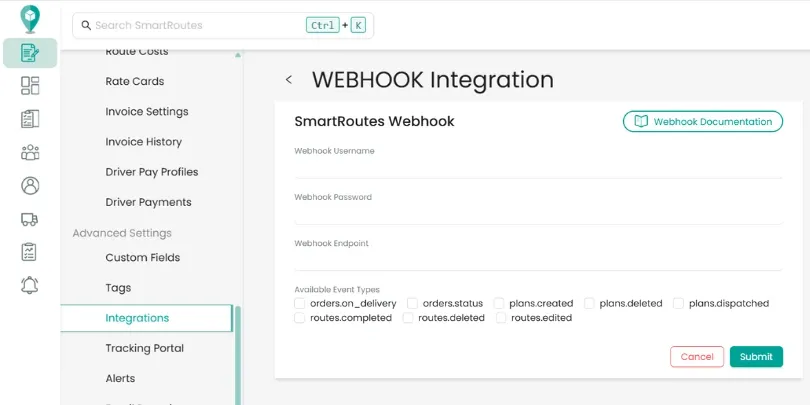
How to set one up:
- Go to Settings > Integrations.
- Select Webhooks.
- Enter a Webhook Username and Webhook Password — these are used to authenticate the requests SmartRoutes sends to you.
- Enter your Webhook Endpoint (the URL that will receive the event data).
- Select the event types you want to be notified about.
- Click Submit.
Available event types:
| Event | Fires when |
|---|---|
orders.on_delivery | An order is out for delivery |
orders.status | An order's status changes |
plans.created | A new plan is created |
plans.deleted | A plan is deleted |
plans.dispatched | A plan's routes are sent to drivers |
routes.completed | A driver completes a route |
routes.deleted | A dispatched route is deleted |
routes.edited | A dispatched route is edited |
Each event is delivered as an HTTP POST to your endpoint, with a JSON body containing the event type and its data payload. Your endpoint should respond quickly. SmartRoutes retries failed deliveries up to three times before marking the event as permanently failed.
Didn’t answer your question?
You can see our other guides here or contact support at support@smartroutes.io.
Please provide us with some additional feedback
Thanks for your feedback. It is greatly appreciated