
SmartRoutes lets you set up internal alerts to keep your team informed about important events happening across the platform, from failed deliveries to low SMS balance.
Each alert can trigger a pop-up notification within the system, an email, or both.
Alert settings
- Click Settings in the top right of the platform.
- Scroll down to the Alerts section.
- Every alert in this section can be configured the same way:
- Toggle it on to receive a pop-up notification within the system whenever that event happens.
- Add an email address (up to five per alert) if you also want that alert sent by email, useful if different people on your team need to be notified about different events.
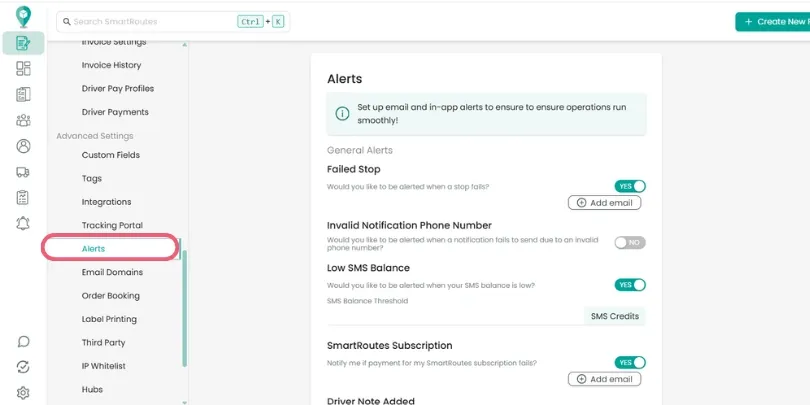
Types of alerts available
Delivery and driver activity
- Failed stop: notifies you whenever a driver marks a stop as failed.
- Driver note added: notifies you when a driver adds a note at a delivery.
- Driver starts their route: notifies you when a driver taps "start route" in the driver app.
- Scheduled routes: notifies you when the scheduled routes feature has automatically created a route.
Customer communication
- Invalid notification phone number: notifies you when the system can't send a text message to a customer because the number is invalid, so you know they didn't actually receive the update.
- Customer note added: notifies you when a customer adds a note via the tracking portal.
- Tracking portal alerts: notifies you when a customer accepts or declines a delivery or collection through the tracking portal.
Account and billing
- Low SMS balance: notifies you when your text message credit balance is running low.
- SmartRoutes subscription: notifies you if a subscription payment fails.
Integration and API
- Address location warning: notifies you when address data sent via the API can't be located on the map, for example, due to a missing or mismatched postcode.
Order booking
- Order booking alerts: notifies you when a customer confirms or declines a booking through the booking portal's date picker.
Related guides
- How to Enable Driver Push Notifications
- How to Set Up Driver Questionnaires
- How to Setup Recurring Routes
Didn’t answer your question?
You can see our other guides here or contact support at support@smartroutes.io.
Was this guide helpful?
Yes
No
Please provide us with some additional feedback
Submit
Thanks for your feedback. It is greatly appreciated