
There are a few ways to change a route's start time in SmartRoutes, depending on whether you're adjusting an existing vehicle, setting one up for the first time, or overriding the time directly on the route.
Option 1: Adjust the start time via Manage Vehicles
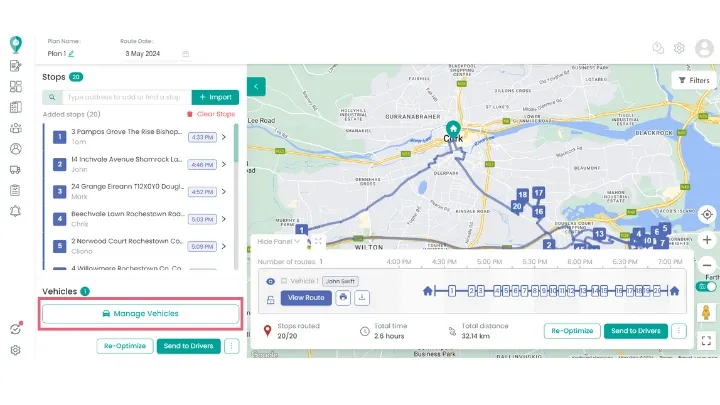
- Once your route is generated, click Manage Vehicles.
- Select the vehicle assigned to the route you want to adjust.
- Under Availability, update the Shift Start and Shift End times. You can also add a driver break here if needed.
- Click Re-Optimize to update the route based on the new times.
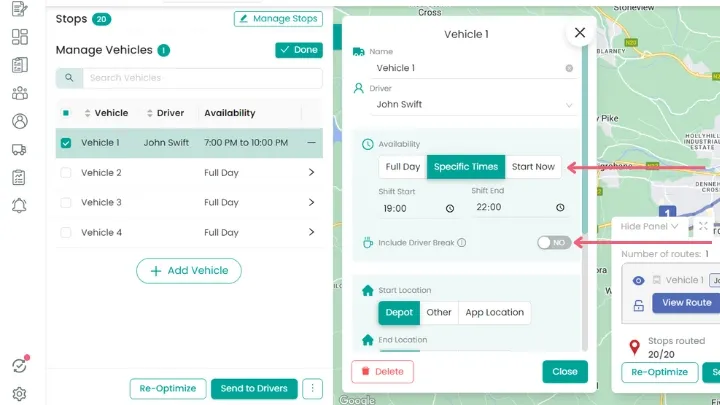
Re-optimizing is essential here, this recalculates the most efficient stop order and ETAs based on the new start time, rather than just shifting every stop by the same amount.
Option 2: Set shift times when creating a new vehicle
If you're setting up a new vehicle rather than editing an existing one, you can set its shift times as part of that setup instead of adjusting them afterward.
- Click Create Vehicle.
- Enter the vehicle Name and assign a Driver.
- Under Availability, choose Shift, Full Day, or Start Now.
- If you selected Shift, enter the Shift Start and Shift End times.
- Toggle Include Driver Break on if needed.
- Click Save.
This vehicle will now use these shift times by default for any route it's assigned to, so you won't need to adjust the start time separately afterward, unless a specific route needs something different.
Option 3: Override the start time directly on the route
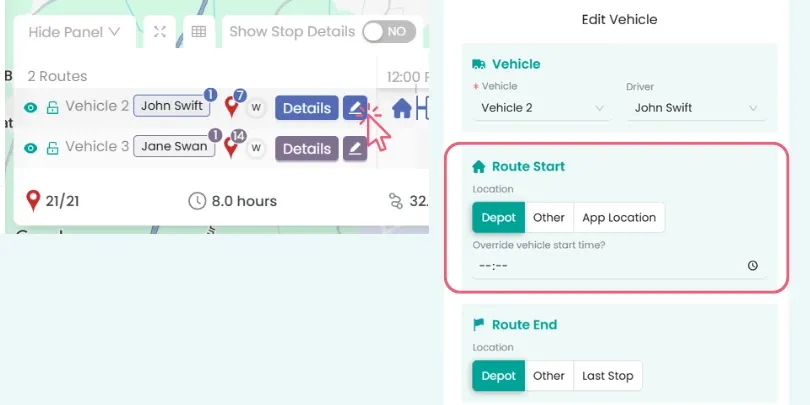
You can also override the vehicle's usual start time for a single route, without changing the vehicle's default shift settings. This is useful for a one-off change, for example a specific delivery day that needs an earlier or later start than usual, without affecting every other route that vehicle runs.
Go to: Edit Route > Edit Vehicle. Then adjust the Route Start time.
Didn’t answer your question?
You can see our other guides here or contact support at support@smartroutes.io.
Please provide us with some additional feedback
Thanks for your feedback. It is greatly appreciated