
There are a number of reports and analytics available for you in SmartRoutes desktop app.
Tracking delivery data allows dispatchers and operations managers to monitor driver progress in real time and evaluate overall fleet efficiency over custom date ranges.
To view your analytics:
- Click on Reports in the main left-hand navigation menu.
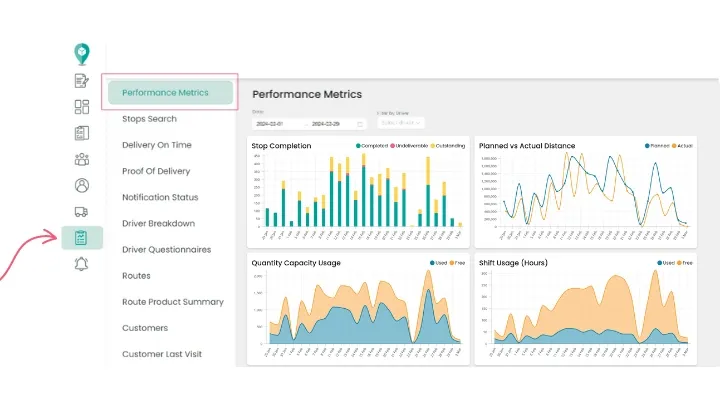
- By default, this opens your central Performance Metrics dashboard.
The dashboard summarizes high-level operational trends across your entire fleet, including:
- Stop Completion: Displays total completed, undeliverable/failed, and pending stops across selected periods.
- Planned vs. Actual Distance: Compares optimized route estimates against the actual mileage covered by drivers to measure on-road adherence.
- Quantity Capacity Usage: Tracks how effectively your vehicles utilize their assigned weight, volume, or unit capacities across routes.
- Shift Usage: Analyzes driver active working hours against total scheduled shift availability to help balance workloads.
Simply click on reports in the left hand navigation as shown below. This will bring you to the 'Performance Metrics' Dashboard.
Review Detailed Stop and Route Progress
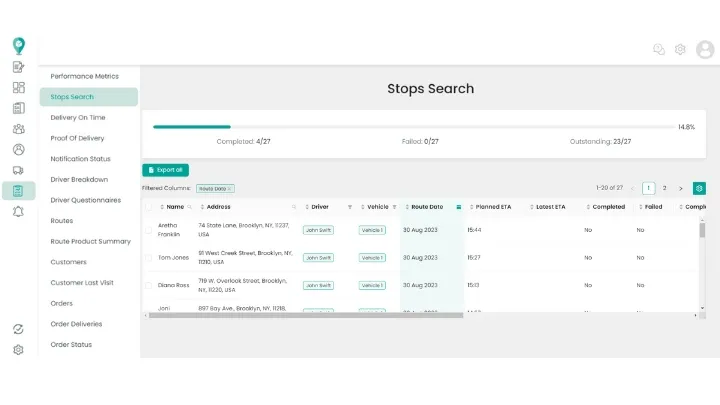
Beyond high-level metrics, you can dive into granular operational records using the Stops report.
From this view, you can audit the real-time status of individual stops—including successful drop-offs, failed attempts, and stops still outstanding. Use the built-in filters to narrow down your data by:
- Specific date ranges
- Individual drivers or assigned vehicles
- Specific routes or delivery territories
Clicking into individual stop records reveals exact completion timestamps, geocoded driver locations, customer notes, collected proofs of delivery, and recorded failure reasons if a delivery could not be completed.
Monitor Customer Notification Status
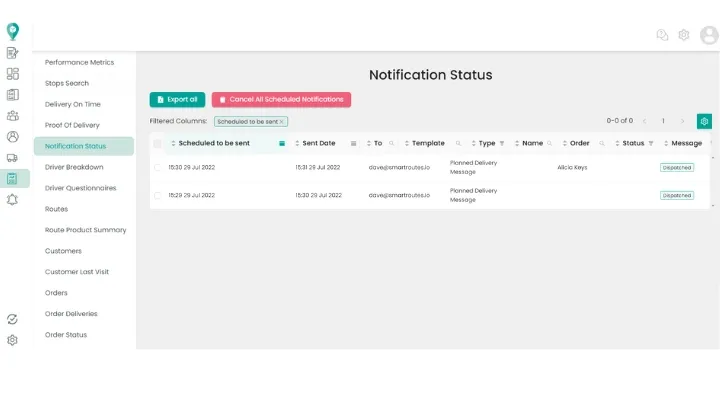
Keeping customers informed is vital for first-time delivery success. Within your reporting tools, you can review the status of automated SMS and email notifications sent to recipients.
This view lets dispatchers verify whether customer tracking links, ETA alerts, and delivery confirmations were successfully delivered or encountered issues (such as invalid phone numbers).
Related Guides
Didn’t answer your question?
You can see our other guides here or contact support at support@smartroutes.io.
Please provide us with some additional feedback
Thanks for your feedback. It is greatly appreciated