
Integrate SmartRoutes with your Shopify store to automatically send delivery information and further streamline your operations. Share vital info such as:
- Delivery address
- Contact info
- Order information
How To Integrate Your Shopify Store With SmartRoutes
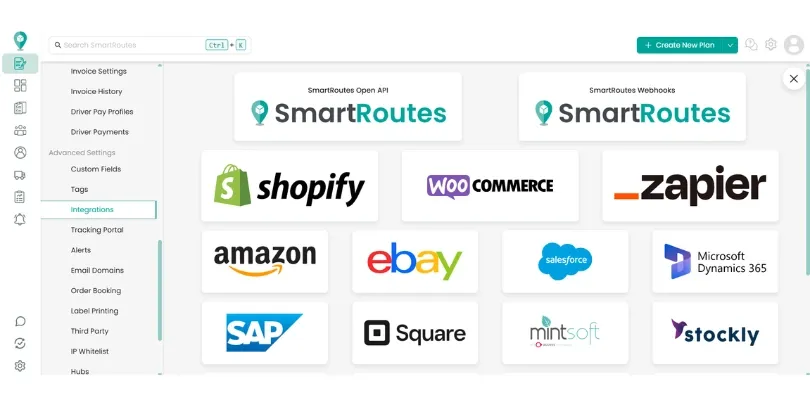
First you need to open your SmartRoutes account and navigate to the integrations section in the settings menu. From here click on the Shopify logo.
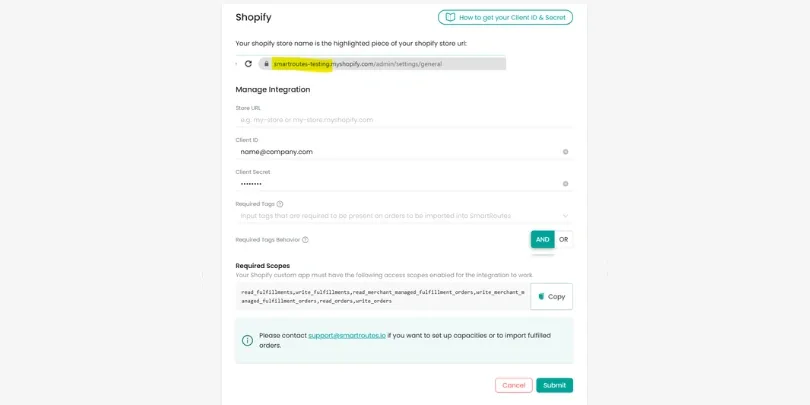
The setup screen now asks for your Store URL, Client ID, and Client Secret from a Shopify custom app, along with optional Required Tags if you only want specific orders synced (using an AND/OR match), rather than the access token flow used previously.
Shopify Store Name
Your Shopify store name can be found at the beginning of your store's URL, as shown below:
Shopify Access Token
In order to obtain your Shopify access token, we have put together this useful video to help you find it, watch it by clicking here.
Related guides:
Didn’t answer your question?
You can see our other guides here or contact support at support@smartroutes.io.
Please provide us with some additional feedback
Thanks for your feedback. It is greatly appreciated