
Driver questionnaires help you collect the information your team needs while drivers are out on the road. You can use them for checks before a route starts, information captured at each stop, or end-of-route reporting.
For example, you might ask drivers to complete a vehicle safety check before leaving the depot, record an issue during a delivery, or collect a customer signature before completing a stop.
Types of Driver Questionnaires
You can create driver questionnaires to be completed at different points in their route:
- Stop Questionnaire – The driver completes the questionnaire at each stop.
- Route Questionnaire – The driver completes the questionnaire at the start or end of their route.
How to Set Up a Driver Questionnaire
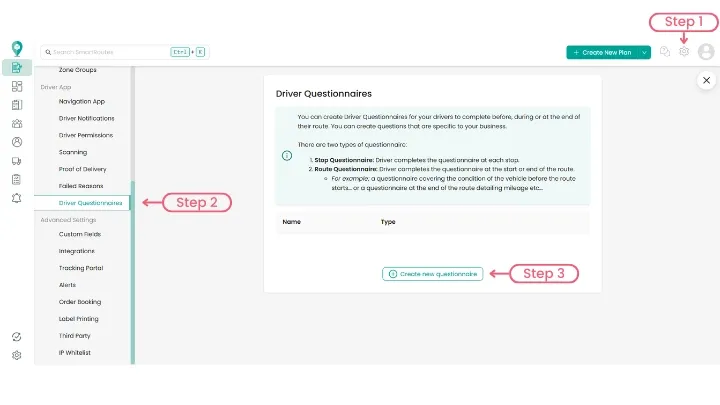
To create a questionnaire in SmartRoutes, go to Settings and select Driver Questionnaires from the left-hand navigation menu. Then click Create New Questionnaire.
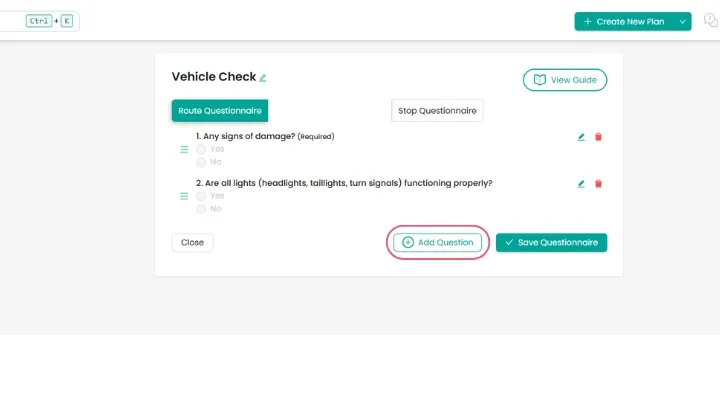
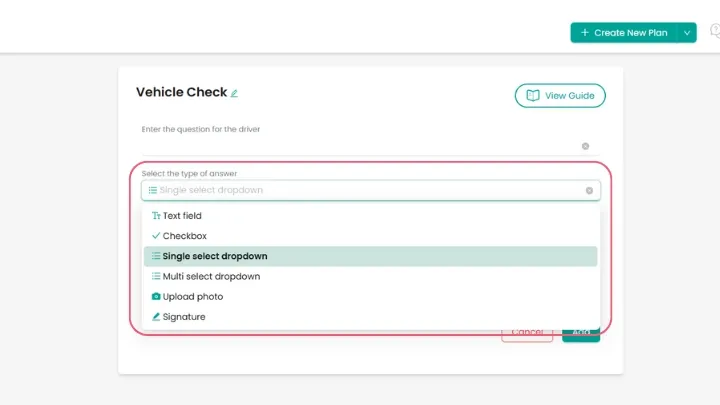
Give the questionnaire a clear name, add the questions your drivers need to answer, and choose the appropriate answer type for each question. Depending on the information you need, this may include text, multiple choice, checkboxes, photo uploads, or signatures.
Mark individual questions as mandatory when drivers must answer them before they can submit the questionnaire.
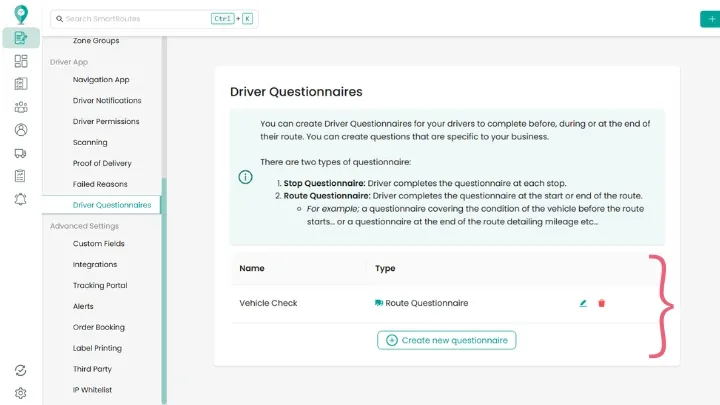
Once saved, all questionnaires will be listed and you can edit, delete, or add new ones as needed.
Make a Questionnaire Mandatory at a Specific Time
Once you have created your questionnaires, you can choose whether drivers must complete one at key points in their route.
- Go to Settings.
- Under Driver App, select Navigation App.
- Scroll to the Questionnaires Workflow section.
- Turn on Should it be mandatory for a driver to complete a questionnaire?
- Select when the questionnaire should be required (On Route Start, On Route Completion + On Stop Completion)
- Use the dropdown beside each enabled option to choose the specific questionnaire you want drivers to complete.
For example, you could require a Vehicle Check questionnaire at route start, an Incident Report at route completion, or a Signature/Liability Waiver questionnaire when completing a stop.
Drivers can access the questionnaire directly through the SmartRoutes app.
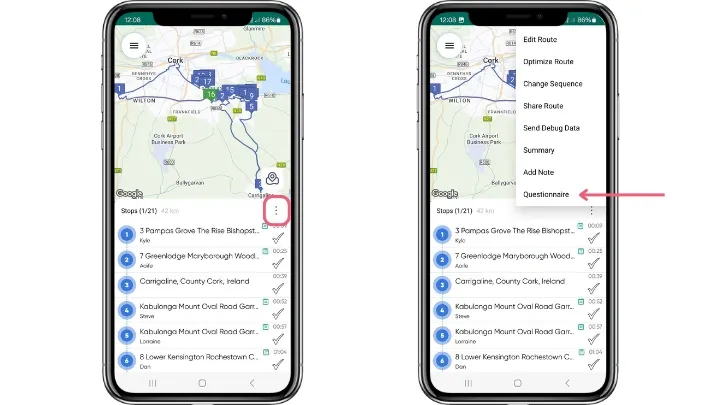
To review driver responses, go to Reports and select Driver Questionnaires.
Common Types of Driver Questionnaires
1. Vehicle Check
If your drivers need to conduct a daily vehicle inspection before starting their route, set up a vehicle check questionnaire with questions like:
- Are there any visible signs of wear and tear?
- Is the fuel level above a specific amount?
- Are the lights and indicators functioning properly?
- Upload a photo of any damage.
Set this questionnaire as mandatory On Route Start if drivers must complete it before beginning their route.
2. Age Verification
For age-restricted deliveries, create a questionnaire that records whether age was verified and, where appropriate for your process, captures supporting information such as a photo or confirmation.
Set this questionnaire as mandatory On Stop Completion when drivers need to complete it before closing a relevant stop.
3. Incident Reporting
If you need drivers to log any issues during their route, you can create an incident reporting questionnaire with questions like:
- Describe the issue encountered.
- Was a customer or vehicle involved? (Yes/No)
- Upload a photo if applicable.
4. Liability Waiver
If you need recipients to acknowledge receipt of goods or agree to terms upon delivery, you can add a liability waiver as a required question at the stop level. This ensures drivers collect a signature at each delivery before completing the stop.
Set up the question as follows:
- Add the waiver text for the recipient to read
- Set the answer type as ‘signature’
- Set the question as mandatory so the driver cannot complete the stop without collecting the signature
When the driver arrives, they can present the waiver on the app, have the recipient review it, and collect an electronic signature to confirm they agree to the terms.
Didn’t answer your question?
You can see our other guides here or contact support at support@smartroutes.io.
Please provide us with some additional feedback
Thanks for your feedback. It is greatly appreciated