
Quick Summary
- Manual delivery planning in WooCommerce quickly becomes time-consuming, error-prone, and difficult to scale for local and home deliveries.
- A WooCommerce delivery route planner pulls orders from your store, optimizes multi stop routes, and gives drivers clear instructions on their phones.
- Ridgeway Farm used SmartRoutes with WooCommerce to reduce planning time, cut driver calls about difficult addresses, and give their office team real time visibility of every route.
- Key features to look for include WooCommerce order sync, live GPS tracking, customer notifications, proof of delivery, and two way status updates back into WooCommerce.
- For WooCommerce stores that manage their own deliveries, route planning software helps reduce fuel and admin costs while giving customers more reliable delivery information.
If you run a WooCommerce store that handles its own deliveries, you know how quickly the logistics side can get messy.
Orders build up, your team spends time manually creating routes, drivers head out with paper lists, and customers wait without any clear update on where their order is. That approach can work for a while, but it does not scale.
A WooCommerce delivery route planner changes how the entire process runs. Orders flow from your store into a delivery plan, routes are optimized in minutes, and drivers get everything they need on their phones. Customers receive live tracking and notifications without anyone on your team sending individual messages.
This article explains why WooCommerce stores benefit from a delivery route planner, what to look for, and what it looks like in practice.
Why WooCommerce Stores Need a Delivery Route Planner
Running deliveries manually is a bigger cost than most store owners realize.
When routes are built by hand in a spreadsheet, on paper, or in someone’s head, the result is usually less efficient than an optimized route. For a WooCommerce store that manages local or home deliveries, that inefficiency compounds every day.
The Cost of Manual Delivery Planning
Time is the first and most obvious cost. A delivery coordinator can spend one to two hours each day building routes that a route planner can generate in minutes. Over a month or a year, that is a significant amount of time spent on work that software can handle.
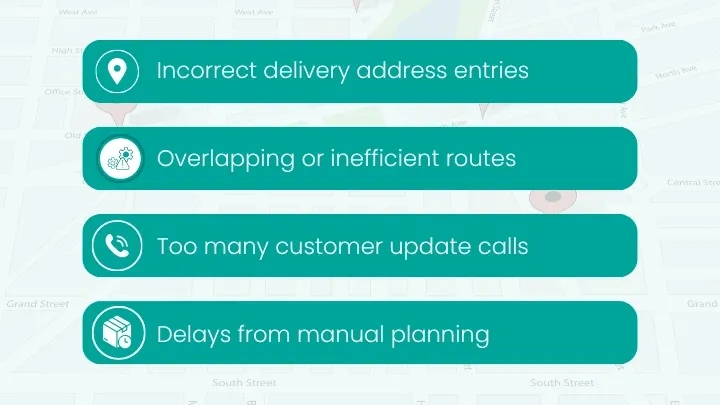
There are also indirect costs. Drivers follow suboptimal paths, orders are occasionally missed, and customers call to ask where their delivery is. Staff then spend time on the phone or email dealing with those queries instead of focusing on new orders and other tasks.
What Automated Route Planning Solves
A WooCommerce delivery route planner addresses these issues at every stage of the delivery process:
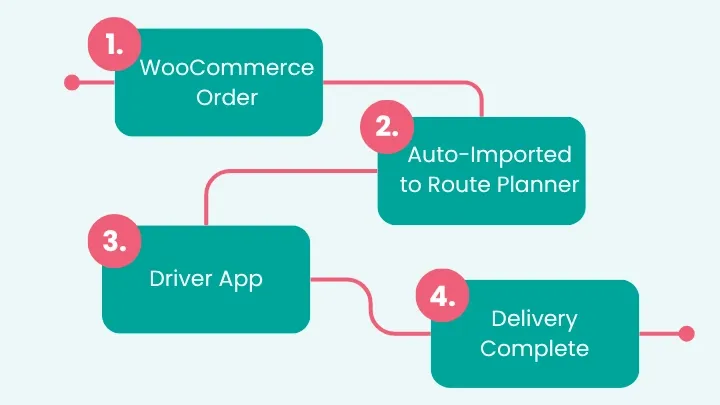
- Order syncing: Orders placed on your WooCommerce store are pulled into the planner with correct address details and order information.
- Route optimization: The system builds an efficient sequence of stops based on delivery addresses, time windows, vehicle capacity, and driver territories.
- Driver dispatch: Routes are sent to drivers’ phones in a single action. Drivers see their stops, customer contact details, and delivery notes.
- Customer notifications: Automated SMS or email updates go out when a driver is on the way, with a live tracking link in many cases.
- Proof of delivery: Drivers capture signatures, photos, or barcode scans in the app, and records are stored against each order.
The end result is a delivery operation that runs on a predictable process instead of ad hoc decisions.
SmartRoutes Route Planning Software
Streamline your entire delivery process, all from one platform

WooCommerce Delivery Route Planner in Practice: eCommerce Farm Delivery
Ridgeway Farm sells Wagyu beef directly to consumers and trade customers across Ireland via its eCommerce store. The store runs on WooCommerce, and as order volumes increased, so did the time their team spent managing deliveries.
They began with a small number of vans and a manual approach to planning. Over time, that approach created more pressure on the team and more uncertainty for customers.
The Challenge
Each day, someone at Ridgeway Farm exported orders from WooCommerce and used that file to build delivery routes. The process involved sorting addresses by rough area, assigning them to drivers, and printing or sending static lists.
As the number of deliveries grew, this led to several problems:
- Routes were not optimized for distance or time.
- Drivers called the office for help with difficult addresses.
- Customers called to ask where their delivery was and when it might arrive.
- The support team had limited visibility of where drivers were at any given time.
They needed a way to link WooCommerce orders to a delivery route planner, generate efficient routes for each vehicle, and give their office team a live view of the fleet.
How SmartRoutes Helped Ridgeway Farm
SmartRoutes worked with Ridgeway Farm to connect their eCommerce orders into a centralized delivery route planner. Once a daily order cutoff passed, the team could transfer all orders for that day into SmartRoutes, complete with addresses and quantities. From there, routes were built automatically for each driver.
Drivers received their route on the SmartRoutes mobile app the evening before their deliveries. In the morning, they started the app, saw their sequence of stops, and launched navigation to the first address. Customer contact details and delivery instructions were available on each stop.
The live routes dashboard allowed the office team to see where every driver was located on a single screen. If traffic held a vehicle up or an issue occurred, the team could see it in real time and decide whether to contact customers or adjust other routes.
The Outcome
Ridgeway Farm achieved several improvements:
- Drivers spent less time making routing decisions on the road and more time delivering orders.
- Address quality improved and the number of calls from drivers about hard-to-find locations fell.
- The support team had real-time visibility of the fleet and could reassure customers without having to call drivers.
- Deliveries felt more reliable to customers, which helped bring the online experience in line with the quality of the product.
This is the type of improvement a WooCommerce delivery route planner can provide for other ecommerce businesses that have moved fulfillment in house.
Key Features of a WooCommerce Delivery Route Planner
Not every delivery route planner is designed with WooCommerce in mind. If you are choosing a route planner for a WooCommerce store, these features are important.
- WooCommerce order sync: The planner should pull orders from WooCommerce without manual export and import. This reduces the risk of human error, such as incorrect addresses or missed orders, and saves time for your team.
- Multi stop route optimization: The system needs to optimize multi stop routes for each driver. It should handle different delivery windows, traffic patterns, driver working hours, and vehicle capacity so that routes stay realistic and efficient.
- Live GPS tracking: Live tracking gives your team an overview of where each driver is and how their route is progressing. This supports better decision making in response to delays and helps your support team answer customer questions with accurate information.
- Customer notifications: Automatic notifications that include expected arrival times and live tracking links reduce inbound “where is my order” calls and improve first-time delivery success rates. Customers feel more informed and are more likely to be at home when the driver arrives.
- Proof of delivery: Electronic proof of delivery, whether by signature, photo, or scan, provides a record for each order. This allows you to resolve disputes quickly and gives your team confidence that orders have been completed as expected.
- Two way status updates: When delivery statuses can feed back into WooCommerce automatically, your team does not have to update orders manually. This keeps order information consistent for customers and internal users.
Bringing Structure to WooCommerce Deliveries
For WooCommerce stores that manage their own deliveries, route planning software can have a clear impact on cost, time, and customer experience. Less time is spent on planning, drivers cover fewer unnecessary miles, and customers receive more accurate information about their delivery.
If you want to see how a WooCommerce delivery route planner could work for your store, you can start a free trial of SmartRoutes and run your first optimized routes with test or live orders.
Frequently Asked Questions
1. What is a WooCommerce delivery route planner?
A WooCommerce delivery route planner is software that connects to your WooCommerce store, imports orders, and builds optimized routes for your drivers. It replaces manual planning with a system that handles order syncing, routing, driver dispatch, and delivery updates.
2. Do I need technical skills to use a WooCommerce delivery route planner?
No. Most WooCommerce delivery route planners are built for non-technical users. You set basic rules for how you want routes to run, and the software handles the optimization and dispatching in the background.
3. Can a WooCommerce route planner handle multiple drivers and vehicles?
Yes. Modern delivery route planners support multiple drivers, vehicles, and delivery zones. You can spread workloads across your fleet, assign routes by area, and track all active routes on a single dashboard.
4. Is a WooCommerce delivery route planner suitable for local deliveries?
It is particularly useful for local and home deliveries. The software groups nearby stops, reduces unnecessary mileage, and helps drivers follow efficient paths through their delivery area.
If you enjoyed this blog, you might also be interested in:
 Caroline Hassett