
Quick Summary
- Onfleet is powerful for high volume delivery teams but quickly becomes expensive for smaller fleets on task based pricing.
- Users say Onfleet’s routing and address handling often struggle with complex time windows and tricky locations.
- Reviews regularly mention laggy dashboards and mobile app slowdowns as delivery volumes grow.
- Many teams now weigh these costs and performance issues against leaner Onfleet competitors before renewing.
Onfleet is a last mile delivery management platform used by high‑volume operations that need advanced routing, real‑time driver tracking, and polished customer notifications.
It brings dispatch, route optimization, proof of delivery, and analytics into one system, which is why it often appears on shortlists for growing delivery teams. But Onfleet’s pricing, feature set, and focus on larger fleets mean many businesses start looking for Onfleet alternatives and competitors that fit their size and budget better.
This guide reviews 5 of the strongest options and where each one makes more sense than sticking with Onfleet.
Why Businesses Look for Onfleet Competitors
Onfleet is a strong option for high volume last mile teams, but many businesses start comparing Onfleet alternatives once they look more closely at pricing, flexibility and real world feedback from users. Recent reviews highlight concerns around cost, route optimization limits and performance issues at scale, which is why a lot of operations now evaluate competitors before renewing their contract.
Pricing
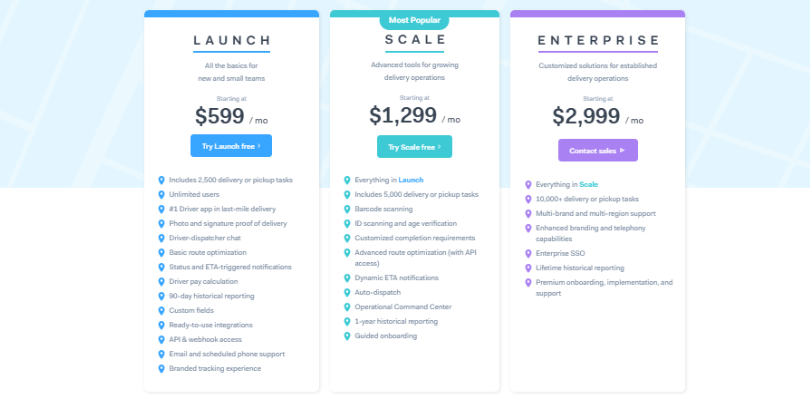
Onfleet’s Launch plan now starts at $599 per month for roughly 2,500 delivery or pickup tasks, with the Scale plan at $1,299 dollars per month for 5,000 tasks and extra features such as barcode and ID scanning. Enterprise pricing begins at $2,999 per month and is aimed at operations that are already handling very high volumes.
This structure makes sense for fleets that can fully use those task allowances, but it is a difficult starting point for small and mid sized teams that only need core route optimization and proof of delivery functions.
Route Optimization
Onfleet provides route optimization as part of its core plans, but some users report that it struggles with bulk optimization for complex delivery windows and still requires manual work to get routes into a shape that planners are happy with.
Reviews also mention mapping quirks, address accuracy problems and cases where routes send drivers back and forth instead of grouping multiple tasks at the same location, which adds extra miles and time to the day.
For teams that rely heavily on tight time windows or operate in areas with tricky addressing, these issues are often a trigger to start looking at other Onfleet competitors.
Ease of Use
While many reviewers like Onfleet’s interface overall, there is a consistent pattern of feedback around performance when accounts reach higher volumes. Users describe lag when filtering large task lists, delays when uploading or updating data and mobile app slowdowns or crashes that affect drivers working full day routes.
Combined with reports of price increases over time, these usability and performance concerns are a common reason why teams with growing workloads begin to explore alternative delivery management platforms that feel lighter to run day to day.
The 5 Best Onfleet Alternatives Compared
Here are the best 5 alternative options for the Onfleet delivery management platform. Let us take you through them one by one.
1. SmartRoutes: Best Onfleet Alternative for Delivery Teams
SmartRoutes is an end-to-end delivery management platform built for last mile operations of all sizes. It brings route optimization, driver dispatch, real time fleet tracking, proof of delivery and automated customer notifications into a single system so teams can replace several disconnected tools with one platform.
SmartRoutes uses per vehicle pricing with unlimited drivers on every plan, instead of charging per task or per delivery volume. For teams running regular routes, this structure keeps costs predictable as the business grows because you pay for the number of vehicles rather than the number of stops.
Key features:
- Multi vehicle route optimization with time windows, vehicle capacity and driver hours included
- One click dispatch directly to the driver app on iOS and Android
- Live GPS tracking with real time route changes from the back office
- Proof of delivery with photos, signatures and barcode scans
- SMS and email notifications that include live tracking links for customers
- Delivery zones and territory management for multi area operations
- Shopify, WooCommerce and Mintsoft integrations on higher plans
Pros:
SmartRoutes gives smaller and mid sized teams access to a full delivery management stack without the cost profile that you see with some Onfleet competitors that charge per delivery or per task. The platform is quick to set up and most teams can create and run routes within a day, while drivers use familiar navigation through Google Maps or Apple Maps in the mobile app. Dispatchers can edit routes during the day instead of restarting the planning process.
Cons:
API access is only available on the higher tier plans so very small teams that want to integrate deeply from day one may need to budget for that level. eCommerce integrations such as Shopify, WooCommerce and Mintsoft also sit on the Premium plan which can feel limiting for very price sensitive merchants.
Rating: 4.8 out of 5 (Capterra)
Starting price: from $32 per vehicle, per month on the Basic plan ($29 p/month when billed annually)
Who it is for: SmartRoutes is a strong fit for delivery teams that run regular routes and want planning, tracking, proof of delivery and customer communication in one place at a predictable cost.
SmartRoutes Route Planning Software
Streamline your entire delivery process, all from one platform

2. Spoke Dispatch (formerly Circuit for Teams)
Spoke Dispatch is a delivery management platform that focuses on fast route planning and simple tools for teams that handle a lot of daily stops. It combines multi stop route optimization, a driver app and a dispatcher dashboard so operations managers can plan routes, track drivers and react to changes during the day.
Instead of charging per driver, Spoke uses a stop based pricing model. Monthly plans include a fixed allowance of stops and then charge for additional usage, which suits teams that care more about stop volume and less about the exact number of drivers on the road. This gives growing courier style operations more control over costs when they are running many short routes in a single day.
Key features:
- Multi stop route optimization that respects time windows and service level expectations
- Spreadsheet and CSV import for fast creation of routes from existing order data
- Driver app with turn by turn navigation and simple reordering of stops during the day
- Live driver tracking and ETAs in the dispatcher dashboard, with tools to reassign stops when drivers are delayed
- Proof of delivery with photos and signatures, plus basic customer notifications by SMS and email
- Delivery zones and multiple depot support on higher tiers, with options to assign drivers to specific areas
Pros:
Spoke is quick for dispatchers to learn and suits teams that need to get up and running without a long setup process. Reviews often highlight the speed of importing stops from spreadsheets, creating routes and then re optimizing when traffic or last minute changes affect the delivery day. The driver app has a clear layout that works well for high stop routes, which helps drivers stay focused on the next address and reduces training time when new staff join.
Cons:
Because Spoke uses a stop based model, monthly costs can move around when order volumes are not stable, and overage charges apply once you cross your included stop limit. The platform has fewer integrations than some other Onfleet competitors, so teams that rely heavily on a specific eCommerce or warehouse stack may need custom work to connect everything.
Rating: 4.8 out of 5 (Capterra)
Starting price: from $125 per month on the Starter plan (includes up to 1000 stops)
Who it is for: Spoke works best for courier and local delivery teams that run many stops per day and want route planning, driver tracking and proof of delivery without a complicated setup.
3. Bringg
Bringg is an enterprise delivery management platform that connects last mile delivery, inventory systems and carrier networks into a single orchestration layer. It focuses on retailers, logistics providers and large brands that need to coordinate many sales channels, multiple fleets and several delivery options such as home delivery, click and collect and third party couriers.
Rather than selling simple route planning, Bringg positions itself as a way to design and control the entire delivery journey from order through to proof of delivery. It offers advanced tools for matching orders to the right fleet, monitoring performance across all carriers and improving on time delivery at scale, which suits complex operations that have already outgrown entry level routing tools.
Key features:
- Central platform to connect in house fleets, parcel carriers, crowdsourced drivers and third party logistics providers
- Route optimization and AutoDispatch that selects the best route and fleet based on rules and performance data
- Real time tracking for every delivery, with live maps for internal teams and accurate ETAs for customers
- Click and collect workflows that link online orders to store inventory and collection points
- Electronic proof of delivery with photos, signatures and time stamps, plus exception management when something goes wrong
- Analytics and reporting across carriers and fleets so teams can track cost per delivery, on time performance and service levels
Pros:
Bringg gives large businesses a single view of deliveries across all of their fleets and carriers, which is valuable when orders come from several channels and are fulfilled in different ways. The platform is strong on integrations and can link order management, warehouse systems and store systems to the last mile, so operations and ecommerce teams work from the same data. Enterprise users also rate the flexibility of its workflows and the ability to design rules that control how orders are assigned to internal drivers or third party providers.
Cons:
Bringg does not publish standard plan pricing and most implementations involve custom projects, which puts it out of reach for smaller delivery teams. Independent buyer guides report that typical contracts start well into five figures per year with separate implementation and onboarding costs, so there is a meaningful budget commitment before value is realized.
Rating: 4.8 out of 5 (Capterra)
Starting price: Pricing is by quote only and not listed publicly.
Who it is for:
Bringg is suitable for large retailers, logistics providers and enterprises that need to coordinate multiple fleets, carriers and fulfillment options across many locations. It is a better fit for organizations that already have dedicated operations and IT teams.
4. RouteXL
RouteXL is a browser based route planner that focuses on single driver routes with many stops rather than full delivery management. Users enter a list of addresses in the web interface and RouteXL calculates the most efficient order, which saves time for small teams and solo drivers who want to cut down on manual planning.
The tool is most popular with small businesses, field service operators and individuals that need to visit several locations in a single trip and do not need live driver tracking or a dedicated driver app. Instead of separate dispatcher and driver views, the system works entirely through the browser and exports optimized routes to navigation apps such as Google Maps or TomTom.
Key features:
- Web based route optimization for multiple stops on a single route
- Free tier that supports up to 20 stops per route for light use cases
- Paid tiers that increase capacity to 100 or 200 stops per route with better geocoding quality
- Import of addresses from spreadsheets so users can paste in customer lists instead of typing each address
- Export of optimized routes to navigation devices and apps, including sat nav systems and mapping apps
- Options for time windows, service times and basic priority settings on stops
Pros:
RouteXL is attractive for very small delivery operations and solo drivers because the free version already covers up to 20 stops per route, which removes the need to commit to a subscription at the start. The paid plans remain affordable and focus on increasing the number of stops and improving geocoding, which is often all that simple use cases actually need.
Cons:
RouteXL does not provide a dedicated driver app, live fleet tracking or proof of delivery, so it cannot replace a full delivery management system for teams that need strong operational oversight. Routes are planned as single driver journeys, so multi driver dispatch and route balancing require manual work and create extra steps as operations grow.
Rating: 3.5 out of 5 (Capterra).
Starting price: free for up to 20 stops per route, then from €35 per month.
Who it is for:
RouteXL suits solo drivers, small courier services and local businesses that mainly need a fast way to optimize single driver routes from a browser and are happy to use external apps for navigation.
5. Route4Me
Route4Me is a last mile route optimization platform that focuses on planning and managing large sets of routes across multiple drivers and vehicles. It is widely used by fleets that handle complex routing problems such as many stops per day, several depots and tight time windows that need careful planning.
The platform combines a powerful optimization engine with tools for dispatch, live tracking and post route analysis so operations teams can keep control of hundreds of routes at once. It is designed more for ongoing daily use in larger fleets than for occasional planning, and the feature set reflects that focus on scale and flexibility.
Key features:
- Multi route and multi driver optimization that can handle large stop lists across several vehicles at once
- Support for time windows, service times, vehicle capacity and multiple depots for more realistic planning
- Web based dispatcher dashboard that shows all routes on one map with drag and drop editing of stops between routes
- Mobile apps for drivers on iOS and Android with in app navigation, status updates and proof of visit capture
- Real time tracking of routes so dispatchers can monitor progress, adjust routes and respond to delays during the day
- Add ons for industry specific workflows, territory management, truck routing and advanced analytics
Pros:
Route4Me is strong for fleets that need to see many routes on one screen and move stops between drivers while still respecting time windows and other constraints. Users appreciate the flexibility of the system and the fact that it can grow from simple single driver use cases into multi depot, multi region operations without switching platforms.
Cons:
Route4Me is not the easiest tool for new users and several reviews mention a learning curve, especially when working with larger route sets and more advanced features. Some reviewers also point to occasional routing issues, mapping quirks and the need to lean on external navigation apps to get the best driving directions in certain areas.
Rating: about 4.5 out of 5 (Capterra).
Starting price: Pricing is by quote only and not listed publicly.
Who it is for:
Route4Me is a fit for small to large fleets that run complex multi route and multi driver operations and are willing to invest time in setup in return for a very flexible routing engine. It suits organizations that want detailed control over routes, constraints and add ons.
How to Choose the Right Onfleet Alternative
The best tool for your business depends first on how many stops you run, how many vehicles you operate and how complex your routes are. If you are running a handful of local routes with simple requirements, a lightweight route planner can work well, while larger fleets with strict time windows, multiple depots and service level targets will need a fuller delivery management platform. Being clear on your current and future delivery volumes, service areas and promised delivery times will narrow the field quickly.
Next, map your must have features. At a minimum, most delivery teams now expect route optimization, a driver app, live tracking, proof of delivery and customer notifications. From there, think about integration needs with eCommerce, order management or warehouse systems.
Factor in usability and the level of support you want from your provider. A tool that looks powerful on paper but is difficult for planners and drivers to use will not deliver the improvements you expect in practice.
If you want to see how this looks in a single platform, you can try SmartRoutes with a 7 day free trial, with no card details required.
FAQ
1. What is Onfleet?
Onfleet is a cloud based last mile delivery management platform that helps businesses plan routes, dispatch tasks to drivers, track deliveries in real time and collect proof of delivery. It is widely used by delivery teams that want a clear dispatcher dashboard, a dedicated driver app and automated customer notifications for each order.
2. What companies use Onfleet?
Onfleet is used by a mix of retailers, grocery and food brands, courier services and cannabis delivery companies in North America and beyond. Public examples mentioned in industry sources include Sweetgreen, Kroger and Total Wine & More, along with a long tail of regional delivery services and specialist operators.
3. How much does Onfleet cost?
Onfleet uses a tiered subscription model based on the number of completed delivery or pickup tasks per month. The Launch plan starts at around $599 per month for roughly 2,500 tasks, the Scale plan starts at about $1,299 per month for 5,000 tasks, and Enterprise plans begin around $2,999 per month or more.
4. What do Onfleet reviews say?
Across review platforms such as Capterra, G2 and Software Advice, Onfleet holds an average rating of around 4.6 out of 5, with many users praising its ease of use, live tracking and customer notifications. Some reviewers also mention concerns about pricing for smaller teams, performance at higher volumes and limits in route optimization for more complex operations.
If you enjoyed this blog, you might also be interested in:
 Caroline Hassett
 Caroline Hassett