

Quick Summary
- A Shopify delivery route planner links store orders directly to optimized multi-stop routes, replacing spreadsheets and manual planning with automated sequencing, tracking, and proof of delivery in one system.
- As order volumes grow, route planning software helps Shopify stores save time, reduce delivery costs, and improve the customer experience with clearer ETAs and tracking links.
- A Shopify delivery route planner removes manual tasks like exporting CSV files, copying addresses into Google Maps, printing routes, and briefing drivers one by one.
- A Shopify delivery route planner can support local delivery routes, regional drops, and nationwide deliveries by grouping orders into routes based on zones, postcodes, or distance from a depot.
Shopify is used by millions of websites worldwide, giving retailers of every size access to an enterprise‑grade commerce platform without enterprise overhead.
For stores that offer local delivery, the missing piece is often a reliable Shopify delivery route planner that can turn incoming orders into efficient, trackable routes instead of manual lists in Google Maps.
SmartRoutes connects directly to your Shopify store so orders flow automatically into optimized delivery routes, removing the need to re‑enter addresses, build routes by hand, or manually mark orders as fulfilled. When a driver completes a stop in the SmartRoutes app, the order status is updated in Shopify, so your delivery operation and your storefront stay in sync without extra admin work.
eCommerce Home Delivery Challenge
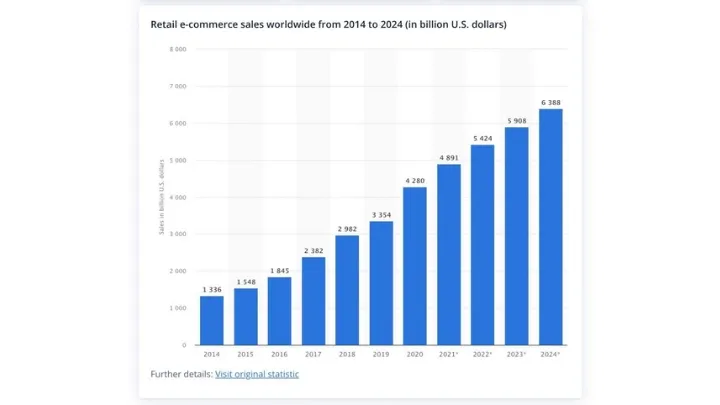
Global eCommerce has grown from billions to trillions in annual sales over the last decade, with online retail projected to reach close to 8 trillion dollars in the coming years. More shoppers have reliable internet access, trust online payments, and expect fast or even free delivery as a standard part of the buying experience. Mobile commerce continues to accelerate this shift, as buying from a phone is now often easier than visiting a physical store.
This change in behavior is reshaping retail infrastructure. Stores are no longer the only way to complete a purchase; instead, vans, cars, and bikes have become moving storefronts, and the last mile is now the most expensive and operationally complex part of the delivery chain. At the same time, giants like Amazon and Alibaba still dominate global eCommerce, but small and mid‑sized retailers on platforms such as Shopify and WooCommerce continue to drive innovation, niche offerings, and local service.
For these smaller businesses, access to a flexible commerce platform is only half the solution. To compete on delivery experience as well as product range, they also need last‑mile delivery management tools that can plan efficient local routes, keep customers informed with accurate ETAs, and feed delivery status back into Shopify in real time. A dedicated Shopify delivery route planner closes this gap, helping teams control last‑mile costs while offering the kind of reliable, trackable home delivery experience customers now expect.
SmartRoutes Route Planning Software
Streamline your entire delivery process, all from one platform

Why Shopify Businesses Need a Delivery Route Planner
Shopify gives retailers a powerful way to get products online quickly, with millions of businesses now using the platform across more than 175 countries. For stores that offer local delivery or ship from stores and warehouses, the missing link is often a Shopify delivery route planner that can turn incoming orders into efficient, trackable routes instead of daily spreadsheet work.
For an online retail business, the first benefit is time. Instead of spending hours each day exporting orders, building routes in Google Maps, printing directions, and explaining them to drivers, planners can generate optimized routes at the click of a button and dispatch them straight to the driver app. Orders, addresses, and delivery notes are all in one place, routes are sequenced automatically, and as drivers complete stops, delivery status and proof of delivery flow back into Shopify without extra admin steps.
The second benefit is profitability. Last‑mile delivery can account for more than half of total shipping costs, and high delivery fees are one of the main reasons shoppers abandon carts. Route optimization and smart scheduling typically cut total distance and fuel spend by 10-30%, which lowers cost per delivery and helps retailers offer competitive or free shipping without destroying margins. Instead of delivery being a guaranteed loss maker, a Shopify delivery route planner helps bring costs back under control so delivery can at least pay its way.
Finally, visibility and customer experience improve dramatically. With a Shopify delivery route planner, operations teams can see where each vehicle is on a live map, whether routes are running on time, and which stops are at risk of missing their window. Customers increasingly expect tracking links and proactive ETA updates, with more than 90% actively tracking their packages and many abandoning purchases when delivery information is unclear. By sending accurate ETAs via SMS or email and providing live tracking, Shopify merchants can start to offer the kind of delivery experience buyers associate with larger players, without needing Amazon‑level budgets.
Key Features of a Shopify Delivery Route Planner
A Shopify delivery route planner connects your online orders to optimized routes so you can move from manual spreadsheets to an automated, repeatable workflow. At a minimum, it should handle order import, routing, dispatch, tracking, and customer updates in one system.
- Automatic Shopify order syncing: New and updated orders are pulled directly from your Shopify store, so you do not have to copy‑paste addresses or upload spreadsheets each day. This reduces data entry errors and ensures every eligible order is included in the next delivery run.
- Optimized multi‑stop routing: The planner uses routing algorithms to group orders into efficient routes based on locations, driver shifts, time windows, and vehicle capacity. This helps reduce total drive time and fuel usage while making it easier to hit promised delivery slots.
- Driver mobile app with live updates: Drivers receive their routes on a mobile app, with turn‑by‑turn navigation, stop lists, and delivery notes in one place. They can mark orders as completed on the road, which keeps operations and customers up to date without extra phone calls.
- Real‑time tracking and customer notifications: Dispatchers can see where each driver is and how routes are progressing on a live map. Customers can receive SMS or email notifications with ETAs and tracking links, cutting down on “where is my order?” queries and improving the delivery experience.
- Proof of delivery and order status updates: When a delivery is completed, drivers can capture photos, signatures, or notes as proof of delivery, and the route planner can send this status back to Shopify. This closes the loop between your delivery operation and your store, so orders are marked fulfilled automatically and support teams have a clear record of each drop.
How does a Shopify Delivery Route Planning API Work?
A Shopify delivery route planner API connects your store to your routing software so orders flow automatically into optimized delivery routes. Instead of exporting CSVs or re‑entering addresses, new orders that meet certain criteria (such as paid/fulfilled status, tags, or location) are pulled directly into the SmartRoutes planning screen from Shopify in near real time.
When you connect Shopify to SmartRoutes using an API key, the integration reads key order fields; customer details, addresses, products, delivery notes, and any custom attributes, and creates stops on the correct route for the right delivery team. Planners can see all open orders, their assigned routes, and electronic proof of delivery in the SmartRoutes desktop route planner without manual data entry.
Once routes are published, drivers receive their stops on the SmartRoutes mobile app with turn‑by‑turn navigation, delivery notes, and the ability to capture proof of delivery by photo, barcode scan, or eSignature. As each stop is completed, status updates and proof of delivery are sent back through the API so orders can be marked fulfilled in Shopify automatically, keeping your store, customers, and operations aligned.
The integration also supports proactive customer communication. You can trigger SMS or email notifications before and after delivery, send auto‑generated ETA updates (for example when a driver is around 30 minutes away), and give shoppers a live tracking link so they can see where their order is on the route.
Case Study: Shopify Delivery Route Planner in Action at Kerrigans
Kerrigans Master Butchers is a family‑run business in North Dublin that scaled from in‑store sales to nationwide delivery using a Shopify‑hosted online store. As order volumes grew, their team struggled with manual route planning in Google Maps, dealing with missing Eircodes, time‑consuming admin, and inconsistent delivery times. They needed a Shopify delivery route planner that could automate routes and give drivers clear daily schedules.
By connecting their Shopify store to SmartRoutes, Kerrigans moved from manual lists to automated, optimized routes generated directly from online orders. Orders now flow into SmartRoutes with customer details, are grouped into efficient routes by zone and time window, and are pushed to drivers through the mobile app for turn‑by‑turn navigation and proof of delivery capture. At the same time, delivery status updates are sent back to Shopify so orders are marked fulfilled without extra admin work.
The results were meaningful on both the operations and customer side. Kerrigans cut hours of manual planning each month, reduced late or missed deliveries, and gained real‑time visibility over where each driver was on their route. Customers received accurate SMS or email notifications with live tracking links, which reduced “where is my order?” calls and helped the business compete with much larger retailers on delivery experience
Bringing Shopify Orders and Local Delivery Together
For Shopify businesses, delivery is a core part of the overall customer experience. Every order needs clear status updates, accurate ETAs, and a reliable handover at the door, not just a label and a van. A Shopify delivery route planner connects your storefront and your vehicles, providing optimized routes, live tracking, and timely updates without adding extra admin.
If you want to see how this works with your own orders, you can start a 7 day free trial of SmartRoutes and run it alongside your current process. It is a straightforward way to test automated Shopify routing, proof of delivery, and customer notifications on real routes before you decide to roll it out more widely.
FAQ
1. What is a Shopify delivery route planner?
A Shopify delivery route planner is software that connects to your Shopify store and turns incoming orders into optimized delivery routes. It automatically imports order details, sequences stops for each driver, and provides tools for tracking, notifications, and proof of delivery so you can manage local deliveries in one place.
2. Why do Shopify stores need a delivery route planner?
As order volumes grow, it becomes inefficient to export orders, build routes in Google Maps, and brief drivers manually. A delivery route planner automates this process, saves time on daily planning, reduces delivery costs, and improves the delivery experience with clear ETAs and tracking links for customers.
3. How does a Shopify delivery route planner save time for my team?
A Shopify delivery route planner removes manual steps like exporting CSV files, copying addresses into Google Maps, printing directions, and explaining routes to drivers. Planners can generate optimized routes in a few clicks, send them to drivers’ phones, and rely on automatic status updates instead of chasing information by phone or email.
4. Can I use a Shopify delivery route planner for local and nationwide deliveries?
Yes. A Shopify delivery route planner can support local delivery routes, regional drops, and nationwide runs. You can group orders into routes based on zones, postcodes, or distance from a depot and then assign those routes to the drivers or partners who handle each area.
If you enjoyed this blog, you might also be interested in:
 Caroline Hassett
 Caroline Hassett