
Quick Summary
- Manually marking Shopify orders as fulfilled after delivery creates delays, inaccurate dashboards, and more “where is my order?” queries for any store running its own vans.
- Route planning software can pull new orders directly from Shopify, build efficient delivery routes for drivers, and send completion status back to Shopify without spreadsheets or manual updates.
- When drivers mark stops as delivered in the route planning app, matching orders in Shopify can be auto-fulfilled with timestamps and delivery details, keeping data current in real time.
- Automated fulfillment updates improve customer communication by triggering timely Shopify emails and optional SMS tracking links, which reduces delivery-related support messages.
- SmartRoutes connects to Shopify so local delivery orders flow into optimized routes, and proof of delivery plus fulfillment status flows back into Shopify as drivers complete their drops.
If you run a Shopify store and handle your own deliveries, there is a good chance you are still manually marking orders as fulfilled after your drivers get back from their routes. It is a small task; however, it creates a lag where Shopify shows orders as outstanding long after they have already landed on a customer's doorstep.
The fix is simpler than most people expect. By connecting route planning software to your Shopify store, you can close that loop automatically. When a driver marks a stop as delivered in the route planning app, that order is instantly updated as fulfilled in Shopify, no admin, no data entry, no chasing drivers for updates.
The Fulfillment Gap for Shopify Stores Running Their Own Deliveries
Shopify's order management works brilliantly for stores shipping via couriers. The carrier scans the parcel, the tracking number updates, and Shopify marks the order as fulfilled almost automatically. But for merchants running their own vans, that hand off never happens.
Instead, the typical workflow looks something like this:
- Export today's orders from Shopify into a spreadsheet
- Manually plan routes using Google Maps or a similar tool
- Print or message routes to drivers
- Wait for drivers to return or call in
- Manually mark each delivered order as fulfilled in Shopify
- Add any delivery notes or timestamps by hand
This process works at low volumes. As order numbers grow, it does not scale, and the cracks start to show. Shopify shows dozens of orders stuck on "unfulfilled" even after they have been delivered. Customers call to ask if their order has shipped. Your support team cannot give a straight answer because the Shopify record does not reflect what actually happened on the road.
SmartRoutes Route Planning Software
Streamline your entire delivery process, all from one platform

Why the Lag Matters More Than You Think
The gap between delivery and fulfillment status affects:
- Customer notifications: Shopify's automated fulfillment emails only fire once an order is marked as fulfilled. If that update happens hours or days late, customers miss the notification that matters most.
- Reporting accuracy: Your Shopify dashboard shows inflated unfulfilled order counts, making it harder to track performance and spot genuine issues.
- Support volume: "Where is my order?" queries increase when customers see no status update in their account, even if the parcel is already sitting in their hallway.
What Route Planning Software Actually Does
It pulls orders from Shopify automatically so there is no exporting, copying, or pasting between systems. Key details like address, delivery notes, and contact information come through with each order.
It then groups and sequences those orders into optimized routes. The software considers driver start and finish times, vehicle capacity, delivery windows, and geography to build efficient runs.
Routes are dispatched to drivers through a mobile app. Drivers see their stops in order, along with navigation, any special instructions, and customer contact details.
At each stop, drivers can record proof of delivery using photos, signatures, or barcode scans. This creates a clear record for every order if any questions arise later.
When a driver marks a stop as delivered in the app, that action can update the matching order in Shopify, closing the fulfillment loop without extra admin work.
What Changes When Fulfillment Is Automated This Way
No Manual Order Updates
The most visible change is the removal of the post‑route admin session. There is no longer a member of staff working through a list of delivered orders in Shopify at the end of each day. Drivers complete their routes in the app and that activity updates Shopify orders in the background.
Better Customer Communication
Because fulfillment status in Shopify is updated in real time, automated order emails and notifications send at the right moment. Customers receive their confirmation when the order has been delivered, not several hours later.
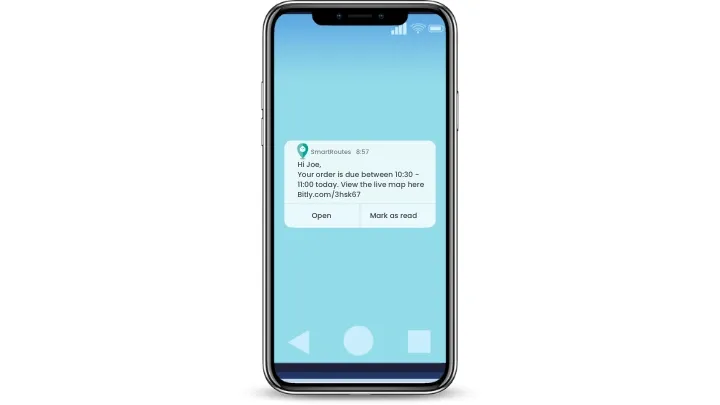
On top of this, route planning software can send customers an SMS with a tracking link that shows the driver on the way. This reduces delivery‑related calls and messages to your team.
Proof of Delivery for Every Order
Proof of delivery captured by the driver in the app, such as photos, signatures, or barcode scans, is stored against each order. When a customer queries a delivery, the team can bring up clear evidence in seconds rather than chasing drivers for information.
Case Study: Kerrigans Master Butchers
Kerrigans is a Dublin-based craft butcher that delivers across the greater Dublin area using a Shopify store for online orders. After bringing deliveries in house, they were manually planning routes in Google Maps and updating Shopify orders one by one, which quickly became unmanageable as volumes grew.
By connecting Shopify to SmartRoutes, orders started flowing into the platform automatically each day. Routes were built and sent to drivers, and delivery status flowed back into Shopify without manual work. The two way integration meant delivery information, geo stamps, and timestamps appeared in Shopify as drivers completed drops, instead of being entered later by staff.
Kerrigans now spends far less time on route planning and admin, while customers receive SMS notifications with tracking links that have reduced missed deliveries and delivery related calls.
Closing the Shopify Fulfillment Loop
When you connect route planning software to Shopify, drivers stop being the missing link in your fulfillment workflow and become the trigger for accurate, automatic updates. Each completed stop in the driver app turns into a fulfilled order in Shopify, with delivery details recorded and ready if you ever need them.
For teams like Kerrigans, this has already removed hours of manual work, reduced missed deliveries, and cut down on support messages from customers who are unsure where their order is. The same pattern applies to any Shopify merchant running their own vans or local delivery: once orders flow into a planner like SmartRoutes and delivery status flows back to Shopify, your store becomes a live view of what happened on the road, not a record that needs constant catching up.
If you want to see how this could work with your own routes, you can start a 7 day SmartRoutes trial and connect your Shopify store in a few minutes. That way you can test automatic fulfillment updates with real orders, drivers, and customers before making any long term changes.
FAQ
1. How does route planning software help with fulfillment in Shopify?
Route planning software pulls orders from Shopify, turns them into delivery routes for your drivers, and then sends delivery status back to Shopify. When a driver marks an order as delivered in the app, the matching order in Shopify can be updated as fulfilled automatically, so your admin team does not need to update each order by hand.
2. Do I need a 3PL if I use route planning software with Shopify?
No. Route planning software is most useful when you run your own vans or local delivery instead of outsourcing everything to a 3PL. If you only use couriers, Shopify and your shipping tools may already handle fulfillment updates for you.
3. Is technical expertise required to connect SmartRoutes to Shopify?
The Shopify integration is set up from the SmartRoutes dashboard by entering your store details and enabling the connection. Most merchants can complete this in a few minutes, and the SmartRoutes team can assist if needed.
4. Can SmartRoutes handle proof of delivery for Shopify orders?
Yes. Drivers can capture photos, signatures, or barcode scans in the SmartRoutes app, and these are stored with each order in the SmartRoutes platform. This gives you a record to refer back to when customers query deliveries.
If you enjoyed this blog, you might also be interested in:
 Caroline Hassett
 Caroline Hassett