
Quick Summary
- Out for delivery is the point where your costs, driver performance, and customer expectations all converge, not just another tracking update.
- Most delays after out for delivery come from preventable issues such as poor address data, access problems, missed proof-of-delivery requirements, and weak customer communication.
- Missed or failed deliveries multiply costs through extra miles, re-routing, reloading in the depot, and additional customer support time.
- Clear notifications, accurate ETAs, real-time tracking links, and route optimisation materially increase first-attempt delivery success.
Out for delivery is more than a status update on a tracking page; it is the point in the journey where your operation either confirms or loses customer trust.
For logistics managers, fleet operators, and eCommerce teams, this final leg concentrates the most expensive part of the journey, the highest risk of failed delivery, and the most visible part of the delivery experience.
Getting out for delivery right means tighter route planning, accurate ETAs, clear customer notifications, and a delivery experience that feels reliable and predictable on every route, not just on a good day.
What Does 'Out for Delivery' Mean?
Out for delivery is the delivery status that tells customers their package has been scanned at a local transit point, assigned to a driver, and loaded onto a vehicle for the final step of its journey. In short, out for delivery means a package has been:
- Scanned at the local delivery depot or hub
- Loaded onto a delivery vehicle
- Scheduled to arrive at the final destination that day
Customers typically receive a delivery notification or tracking update at this point, letting them know to expect their order soon. But the story doesn't end there—how this stage is handled can impact customer satisfaction, cost efficiency, and brand reputation.
SmartRoutes Route Planning Software
Streamline your entire delivery process, all from one platform

Where Does Out For Delivery fit into the Delivery Process?
If you’ve ever been keeping a close eye on an order that you need for a certain date, you'll likely have seen something tracking details like the ones below:
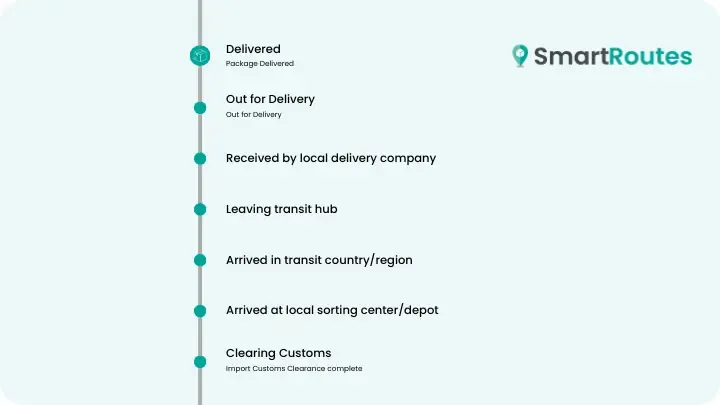
The out for delivery status usually appears at the final stage of the delivery process. This signals the package's imminent arrival at the customer's door. However, this milestone is the culmination of a much longer journey.
1. Order Received
The process begins when a customer places an order online. Once the order is received, it enters the retailer’s system for fulfillment.
Depending on the setup, stock availability is verified through manual checks or more commonly through automated inventory management software, which synchronizes with the eCommerce platform.
2. Order Processing
After confirming stock, the order moves to 'processing'. This stage involves preparing the item for shipment. Warehouse teams pick and pack the product from storage shelves, ensuring it is correctly labeled and packaged for safe transport.
In larger operations, this process may be automated using warehouse management systems (WMS). At this stage, the customer may receive a notification confirming their order is being prepared.
3. Order Fulfillment
Once the item is packed and labeled, the order enters the shipping phase. Here, it is handed off to a courier or last-mile delivery service.
Depending on the retailer's setup, this could be an in-house fleet or a third-party logistics provider (3PL), which manages the package's journey. Fulfillment usually has multiple steps:
4. Fulfillment & Shipping
After leaving the warehouse, the order receives a 'shipped' status. At this point, the parcel begins its journey from the warehouse to the customer’s location.
This step typically includes scanning the parcel into a tracking system, allowing both the sender and the recipient to follow its progress through tracking numbers or apps.
5. In Transit
When a parcel is marked as 'in transit', it’s moving between hubs or distribution centers. Often, packages need to pass through several sorting centers before they are directed to a local delivery hub.
Sorting at these centers ensures that packages are consolidated efficiently to match delivery routes, reducing fuel consumption and optimizing logistics.
6. Out for Delivery
Once a package is scanned and loaded onto a delivery vehicle, it’s marked as 'out for delivery'. This status is one of the most important touchpoints, as it often triggers a real-time notification to the customer.
Last-mile tracking systems offer customers greater transparency during this phase, with real-time updates, estimated delivery times, and even the ability to see where their delivery driver is en route. This helps manage customer expectations and reduce missed deliveries.
7. Delivery Attempt or Completion
When the delivery vehicle arrives at the customer’s location, the final step is the handoff. If the customer is home, the driver will complete the delivery and may require a signature (for high-value items) or simply leave the package at the doorstep or in a designated safe spot.
If no one is available to receive the package, the driver may leave a delivery notice with instructions for rescheduling or retrieving the parcel. Some couriers offer additional options, such as leaving the package with a neighbor or in a locker system for later pick-up.
Reasons Why Deliveries may be Delayed after Out for Delivery Status has been reached
While this status suggests delivery is imminent, several real-world issues can cause hiccups:
Incorrect or Incomplete Address
Incorrect or incomplete addresses can prevent successful deliveries. If a driver arrives at a location based on incorrect information, they may attempt to contact the recipient, but this can lead to significant delays.
In some cases, the delivery may be sent back to the distribution hub for correction or even returned to the sender if the issue isn’t resolved promptly.
To avoid this, it’s essential for both businesses and customers to double-check the provided address during the checkout process.
Customs
If you're ordering internationally, customs clearance can delay the out for delivery status, especially if fees aren't promptly paid.
Customs inspections can also slow things down if the package contains restricted items or incomplete documentation. Businesses shipping internationally should communicate clearly with customers about potential customs fees and how to expedite the process.
Delivery Requires Proof of Delivery
Some items—like high-value electronics, medications, or perishables—require the recipient to be present for the delivery. If the recipient isn't available, the package may need to be reloaded for another delivery attempt.
To prevent missed deliveries, businesses should encourage customers to choose a delivery window when they are most likely to be home or to provide alternate instructions.
Delivery Destination Cannot be Reached
Gated communities or buildings requiring entry codes can delay deliveries if the driver lacks the necessary information. Some residential or commercial buildings have complex access points that require specific instructions or keycodes.
Without these details, drivers are often unable to complete the delivery and may need to reschedule, leading to delays. Clear instructions and updated delivery preferences can help reduce these issues and ensure a smoother final mile.
Unpredictable Issues like Traffic, Weather, or Vehicle Breakdowns
Unexpected events like extreme weather, road closures, or traffic accidents can disrupt delivery schedules, leading to delays and rerouting. These factors are beyond a driver’s control and can cause significant changes in planned delivery routes, potentially delaying multiple orders.
To mitigate these risks, businesses should use route optimization tools that account for real-time changes in traffic and weather conditions, helping drivers adapt quickly and avoid lengthy delays.
The Real Cost of Missed Deliveries
Getting this part of the last mile delivery process right can have an impact on the efficiency and sustainability of the wider supply chain process. By ensuring a package is successfully delivered in the last mile, it avoids unnecessary complications like:
- Drivers having to reroute to make the parcel drop later in the day
- Warehouse staff having to re-allocate the parcel to another route on another day
- Customers becoming annoyed and customer service staff having to resolve the problem
- Added costs associated with poor on time time delivery performance
And while avoiding performance issues such as these is important, it’s really only part of the puzzle.

How to Track a Parcel Once it is Out for Delivery
One of the key reasons businesses let their customers know about the status of their delivery is so that they can track its progress to their door.
With more people now working from home, it allows people to plan their days around the delivery so that they can continue to work without having to keep an eye out for the delivery man throughout the day.
Customers expect visibility.
Most last-mile carriers today provide tracking numbers and live status updates. With solutions like SmartRoutes, businesses can:
- Automatically notify customers when a package is scanned onto a delivery vehicle
- Share real-time tracking links powered by GPS
- Send delivery reminders (e.g., 30-minutes out) to increase successful handoffs
This all works to free up customer service from unnecessary customer queries, reduces failed delivery attempts, and boosts satisfaction.
Last mile carrier tracking has become the norm for businesses that deliver packages direct-to-consumer. With advances in mobile device technology, even the most basic of smartphones now have the necessary capabilities to enable drivers to scan a parcel onto their van or truck in the morning.
Delivery driver apps use the QR scanning feature in a mobile phone's camera, and once the package is on the way, the GPS on the drivers' phone allows the customer to see where it is at any given time.
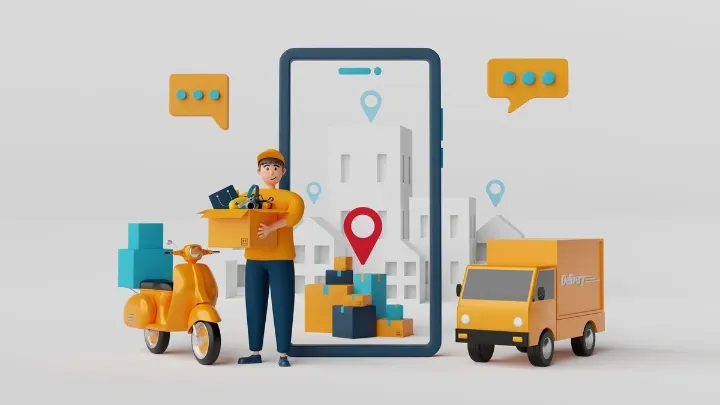
While it might seem like the kind of thing that big carriers like UPS and FedEx do, it’s actually really simple and cost-effective for small businesses once a driver has a smartphone.
On the customer side, custom tracking links can be sent automatically once their parcel has been scanned by the driver.
Case Study: How Musgrave Transformed Their 'Out for Delivery' Process
Musgrave, one of Ireland’s leading food retailers, faced growing communication burdens as demand for home grocery delivery rose.
By implementing SmartRoutes, they:
- Automated delivery notifications with live tracking
- Sent reminder alerts 30 minutes before arrival
- Reduced customer support calls dramatically
It was a win-win: smoother logistics and happier customers. And because they deliver perishable goods, high first-time delivery success was non-negotiable.
Making Sure 'Out for Delivery' Becomes 'Delivered'
Out for delivery doesn't always necessarily translate to a successful delivery, but ensuring that the right tools like delivery notifications, tracking links, and suitable package delivery apps are in place to assist the process is key in getting it right.
While the last mile of the delivery process is fraught with potential problems like loading errors, vehicle breakdowns, and even simple human-error like delivering the wrong package, these delivery apps limit the risks.
A combination of a tried-and-tested process that is religiously adhered to by drivers coupled with a suitable technology solution that controls every touchpoint in the last mile for drivers and customers are the secrets to success.
Visibility and transparency are two of the most important factors in the last mile, and that goes for every stakeholder involved, be it your customer, drivers, dispatchers, or supporting staff.
If you have any questions about how you can improve your own delivery or courier service, we have a team of experts on-hand that help all types of businesses to improve your last mile delivery service.
Whether it’s greater visibility, more transparency for customers, or just more structure you need, we have a solution and a team to help implement it.
Try SmartRoutes for free for the next 7 days.
FAQ
1. What does out for delivery mean for my business?
Out for delivery means a parcel has left the local depot, is loaded on a driver’s route, and is scheduled for delivery that day. For operations teams, it is the point where route planning, driver performance, and customer expectations all come together.
2. Does out for delivery guarantee same-day delivery?
Not always. In most cases, out for delivery indicates the package should arrive that day, but factors like route volume, traffic, failed access, or weather can push the stop to the next day.
3. How long after out for delivery should a package arrive?
Typically within standard delivery hours, often a few hours to the end of the business day, depending on route length, stop density, and any priority rules for that route.
4. How can businesses reduce failed deliveries after out for delivery?
Use accurate address data, clear delivery instructions, pre-delivery notifications, and real-time tracking so customers know when to expect the driver. Route optimisation and proof of delivery tools also help reduce repeat attempts.
5. What metrics should I track for the out for delivery stage?
Useful KPIs include first-attempt delivery rate, average stops per route, cost per failed delivery, on-time delivery rate, and customer contacts per 100 deliveries for “where is my order?” queries.
If you enjoyed this blog, you might also be interested in:
 Michael Santry
 Caroline Hassett